Showing posts with label mining. Show all posts
// // Leave a Comment

Introducing Crypto Pros Mining Pools!

We are proud to announce the launch of our Mining Pools! We offer 2 Auto-Switching Mulitpools, ASMs for short, along with 25 coin specific pools!

There are two Auto-Switching Multipools (ASM) to choose from, one for Scrypt altcoins, and one for SHA-256 based coins including Bitcoin.

The Scrypt ASM currently chooses the most profitable coin to mine, based on current exchange rates and difficulty settings, between 20 alcoins and continually switches between then to increase your profitability.

Notice the green banner, at the time of this picture the ASM was mining DOGE

The SHA-256 ASM currently has 5 coins it chooses from, just as the Scypt ASM does, this pool switches between these five coins as one stands out amongst the other as more profitable to mine at that moment.  

Notice the green banner, at the time of this picture the ASM was mining BTC

If Auto-Switching Multipools are not your thing and you would like to focus specifically on one coin or another, we have you covered. Each coin in our ASMs can be mined solely at your discretion.

For each coin, you can set up automatic payouts to the payment address of your choice.  To best maximize your profitability, we suggest you consider utilizing Cryptsy's auto sell feature.  Read this guide to learn more. 

The mining fee is only 1.5% on all coins except Bitcoin which is at 0%!  Some standard transaction fees apply to certain coins, review the FAQ's for the pools here for full details.

If you have never used an ASM give it a try for a week and compare your results agains mining single coin, you will be impressed with the increase in profitability.

Scrypt Coins
Litecoin (LTC)DigitalCoin (DGC)PhenixCoin (PXC)DogeCoin (DOGE)Mooncoin (MOON)
FeatherCoin (FTC)NovaCoin (NVC)MegaCoin (MEC)Diamond (DMD)Earthcoin (EAC)
Mincoin (MNC)LuckyCoin (LKY)BottleCaps (CAP)Grandcoin (GDC)Lottocoin (LOT)
WorldCoin (WDC)Argentum (ARG)Cryptogenic Bullion (CGB)FedoraCoin (TIPS)AuroraCoin (AUR)
SHA-256 Coins
Bitcoin (BTC)Freicoin (FRC)PeerCoin (PPC)Terracoin (TRC)Zetacoin (ZET)
Read More
// // Leave a Comment

Do you have any spare mining equipment? Thought NOT!

My mining hobby started with the intention of becoming familiar with the Linux operating system.   I thought I was pretty hot stuff with my cool milk crate and way bad 7870s humming in the background, tearing it up at almost 800k hash for the pair. 

How times change. The R9 Series GPUs were released and moving to BAMT killed any opportunity for me to become familiar with Linux. 

So one Saturday I was doing my morning ritual of checking my rigs, coin prices, and performing due diligence for my regular job and had like 8 windows and 30 internet tabs open.  Now this lap top has seen better days and wouldn't stand a chance against even the slowest turtle.  Then the daily blue screen of death popped and got me to thinking. 

I have a spare motherboard that is in great shape except for one PCIE slot that was wrecked trying to put in a presence wire.  Throw in one of those 7870s that was just decommissioned the other day,  spare power supply and that’s halfway to a new computer!

Off to the electronics store again to scoop a case, RAM, CPU and hard drive.   It was interesting that many cases didn't have fans, but the friendly associate pointed me towards one that already had the fans installed, a little more expensive, but hey, it was $70 and made it easier on me.    Being this was a work computer the CPU and RAM was upgraded over what was in my mining rigs, and of course this rig would not be running on a USB stick, so a 1 TB hard drive was added along with a DVD Burner just because it was cheap ($17).

All together (including my spare stuff) this computer ended up under $800, and after getting mining rigs working putting this together was a relative piece of cake.  It did take a little more time due to all the case wiring, but by the late afternoon I was up and running on my new Linux (Ubuntu) system. 

Overall it is pretty cool looking with several fans that glow blue, and more USB ports than the average person could ever dream of using.
 
Most importantly Ubuntu provides a nice stable platform and plenty of speed to handle all the windows and tabs that would kill my laptop in no time.

One would think this would be the end of story, but ARR Matey we be miners, and miners cannot just leave GPUs laying around not mining!   The second de-commissioned 7870 was calling my name that next morning, so with a riser cable, a little farm boy engineering (ie: tie wraps),  and a download of Cgminer  we were off and running.   After dropping the intensity down to 17 on GPU 0 the computer responded as it had before, nice and fast.  Now granted any gaming would probably require a mining shut down, but I guess there won't be any game playing on this computer!

So now I have my Linux system that can handle about anything I can throw at it and it puts out a steady 775k hash.  What more could you ask for!


Be safe, find MoAr blocks!
Read More
// // Leave a Comment

Keeping Your GPUs Cool


When building my second rig, I decided to go with R9 270s.  I started with 2 GPUs of one flavour, then 2 more of another, and added a third flavour to round out my 5 card set-up.   Slightly painful, but in relatively no time was up and running.

For what ever reason this rig was hard to keep cool.  I added small fans which helped, and finally a desk fan that helped a little more, but it seemed the temps would continue to creep upward to the point where I could not get these 2 cards to go below 80 °C and on one sunny day found them at 90°C.  OUCH!

Well it was time to take action as more air flow wasn’t going to fix this problem.   I decided the next step was to check the thermal compound, as I have several R9 270s that run in the 60°C range.  Surely, there couldn't be a 20°C disparity between cards doing exactly the same thing right next to each other, or could there?

This was a new project for me, so I was a little hesitant not being a electronics guru, but let me share with you what I went through and my findings.  This particular card didn't seem to have any seal to indicate I had taken the card apart, but performing this operation could void your warranty. 

The victim (GPU) was identified in the early morning when my rigs are coolest and was operating at 81°C as compared to low 60°C for most my other GPUs.


Separating the heat sync from the main board required removal of four spring-loaded screws.  Now sometimes separating can be difficult and require a little twist as the thermal compound can act as a slight adhesive, but in my case the two pieces separated as soon as the screws were removed.  This was interesting as I expected I would at least have to gently pull them apart.

Well looky here! It looks like plenty of thermal compound was used, its just that very little was where it was supposed to be.  You be the judge, but it looks to me like only 50% of the contact area between the GPU and heat sink actually had thermal compound on it.  No wonder this card was running so HOT!  I should point out that this GPU was brand new just 30 days ago, and I haven't had such temperature issues with the other two brands in my rig.

Time to clean up and re-apply the thermal compound.   I used some alcohol, Q-tips, and some cotton rounds.  This is a delicate job, but should only take 5 minutes.  Don't be over generous with the alcohol or press to hard.  The compound comes off relatively easily, and we don't want to be drowning or rubbing of the components.


There we go all clean and ready for a new application of the thermal compound.  Just a small bit is all that is needed.  This is one area where more is not better.


You can re-assemble at this point, but I wanted to be sure I had 100% coverage so I spread the compound out over the GPU. I just used a small flattened straw and then re-assembled.

Time for the moment of truth.  Upon re-inserting our victim back into its previous location and running for 10 minutes it was holding a steady 64°C.  After 4 hours it was up to 65°C,and the next morning it was cruising at 62°C!

So SUCCESS!  I was able to reduce my GPUs temperature by more than 15°C, which is not only good for the GPU, and its mates, as they are also operating cooler, but it also helps keep my space cooler not having a 81°C heater running continuously!

Be Safe and find MoAr blocks!


Read More
// // Leave a Comment

Multiple GPUs and Interference with Other Devices

I was pretty stoked to get multiple Litecoin rigs running.  It seemed I had this figured out and could put a rig together quite quickly and have it mining happily.

Unfortunately, it seems issues just pop up and the source of these issues is not always readily apparent even though your rigs are mining away happily.

I had noticed that my cell phone was receiving poor coverage and my TV was acting up.  Typical, it seems there is always something when dealing with electronics.  After messing around, I figured out the closer I moved my phone to my miners the fewer bars of service I would have.  3' little or no service, 6' I would get a single bar, 12' 3 bars, and 15' mostly all the bars.

The light finally went off in my head that I bet that is why the TV is not working as it to is fed via wireless.   One way to find out. My rigs location was only temporary, and my new spot was ready to go, so time to do a move.

INTERFERENCE! Yes, the yellow flag was thrown on me.

Upon moving my rigs to the new spot, my phone immediately had good service and my TV began working again. 

So why did this occur with a consumer device used by so many in the world.

Its all about the Implementation and intended use!

Yes, GPUs are covered under the Federal Communications Commission (FCC) rules and regulations as a interfering device, BUT I am not using the GPUs as intended.

They are intended to be mounted in a case/shelf that reduces the amount of emissions.  The reason why your gaming computer wouldn’t be a issue is the GPU is in a enclosed environment.

GPUs were never intended to be mounted in a open air shelf, suspended from the mother board via tie wraps, and connected by a ribbon cable that is also powered, and fed by a platinum rated 1200 watt power supply.  All this being cooled by a box fan and a mini air conditioner. Multiply this by your number of rigs and you have the makings of a serious generator of unwanted frequencies.

This is probably why BAMT is set-up to handle only a wired connection and requires some effort to implement a wireless connection.  The developers either knew (or got lucky) that having several rigs in close proximity would hurt or even kill your internet stability as reviewed here Internet Stability.

If your wireless devices start to operate weirdly, poorly, or not at all, be sure to consider your rigs as the potential source.

Read More
// // Leave a Comment

Multipool Wins Against LTC Solo, on to Round 2 vs. DOGE

We have concluded our test of Multipool.us vs. Coinotron LTC, and I must say it wasn't even close. Multipool.us out performed Coinotron single pool mining LTC by a wide margin.

Multipool.us will now face-off with DOGE coin solo by popular demand.


Below is the overview of Multipool.us vs. Coinotron LTC:

Week 1


Friday, January 24, 2014

Single Pool mining LTC: 0.0531086748176898 BTC
Multi Pool Mining: 0.09709125 BTC

Week 2

There was a delay in posting this weeks data, results are calculated on the 4th.
Tuesday, February 4, 2014

Single Pool mining LTC: 0.12048 BTC
Multi Pool Mining: 0.16155933 BTC

Week 3


Friday, February 7, 2014

Single Pool mining LTC: 0.061 BTC
Multi Pool Mining: 0.090473 BTC

Week 4


Friday, February 14, 2014

Single Pool mining LTC: 0.05276 BTC
Multi Pool Mining: 0.0969843 BTC

Total


This brings our totals to:

Multipool.us: 0.44610788
Coinotron LTC: 0.28734867481769

This is an amazing victory for multipool.us. This test was ran for a full 4 weeks with 2 identical rigs on the same network. There was a 2 hour downtime on our network and both rigs where affected equally.

Our next test will be Multipool.us vs. DOGE solo mining. This test will start Monday, February 17th, the first results will be posted Monday, February 24th and each Monday after that for 4 weeks.  

Will the champion hold onto the title? Comment Below.

Read More
// // Leave a Comment

Litecoin Mining and your Internet Connection

It was pretty exciting days when I was able to get my first rig up and running, a lot of reading, tinkering, and unfortunately some smoke, but once the smoke cleared there were all these numbers, everywhere!

Learning what they all meant, how they impacted your mining rig, and then optimizing can be little overwhelming and ultimately time consuming.  Now there may some closet case ADD individuals out there that just like to look at the pretty numbers all day, but generally I would guess you built your mining rig to make a extra dollar or two and your in good company. 

There is a common thread across all mining platforms, and that is the Internet.

No matter how small or large your investment, without the internet that bad ass, redneck, finely tuned, highly planned, self-contained, rack mounted, pre-ordered, multi core, server farm is going to generate the same amount of coins my smoking unit did.  Nada!

Being cost conscience is definitely a important consideration and in building my first rig, I didn't go all out and that included my internet connection.  When I went to scoop my mining rig parts at the local electronics store, I saw they had a sale on a name brand wireless dongle.  $9.99 (SCORE!)  I mean really, all that is needed is a internet connection and a low speed one at that so this 50 Mbs device should be the just the ticket.

As I have mentioned before it took me days to get my first rig running.  Issues, in-experience, and smoke filled these days, but the day arrived when my rig was up and made it through the night.   Now I had to figure out all these numbers.  One that caught my eye was on the Pool DashBoard. Hmmm, , 92% efficiency while the Pool itself was over 99%.  Further investigation revealed that I was probably pushing my cards a little much as they were running a little warm.  So I backed them down a bit and achieved 96% efficiency, while cooling down my cards a little.  Better, but clearly I was missing something.  I messed around for a few more days to no avail, till one morning I checked in and my efficiency had dropped to 85%, and a few hours later 50%.  Crap!  Now what.  It took me a while, but was finally able to get over my denial that wireless is awesome and never breaks.  Ran to another local store and scooped another name brand (more expensive) dongle.  Well that fixed the problem, but still I was sitting at 96% efficiency.   One more thing to try, I ran a long Cat 5 cable from my cable modem and plugged it directly into my rig.  My efficiency began to climb and for the last 60 days that rig has been running at 99.5% or better efficiency.

So, what did I learn from this?

Just because you have a great WiFi signal, pass all your speed tests and can cruise the internet doesn't mean you have a connection suitable for your mining rig.   You only need a minimum of bandwidth, but it must be stable.

And remember that super awesome SCORE?  By electing to purchase a cheap item made with cheap parts I introduced a weak link into my system and I paid for it with days of trouble shooting, the purchase of another dongle and ultimately doing what I should have done in the first place.  Hard-wire that connection.
Read More
// // Leave a Comment

Know Your Mining Rigs Power Consumption

So you are thinking of adding another rig to your collection. Gratz! Nothing a like a little extra boost to your hash rate and number of coins you receive.  There probably wasn't a lot of thought given to electricity on the first rig except for how much it may add to your monthly bill.  As you move into multiple rigs electricity needs to be more than a consideration as a monthly expense but included in your overall plan.

Buy Here
First you need to get a idea idea of what your rigs consume.   I like to run each rig on a meter similar to the one pictured here and keep it in my note book for future reference and possible trouble shooting.  This is a easy device to use, just plug it into the wall and your rig into it and you are able to see the number of watts being consumed.  They usually have other features like adding your power costs to provide a hourly, daily and monthly cost, but for me I am just interested in how many watts are consumed.  These can be found about anywhere, I got mine from Amazon and it was like $17.

My rigs to date have been based on a single model though different manufacturers, so I do see a variance of 50 watts between rigs. So each of my rigs draws from 850-900 watts.  So how do I use this information?

This mining adventure is not my full time job, so that means my rigs are in my home.  You could substitute home for apartment, office, garage, or whatever space you have dedicated for your rigs.  You first need to identify where your electricity is and how it is connected.  Go to your breaker panel and open the door.  If you are lucky each breaker is marked with the general areas each serves.  If not you are going to need to figure it out.  Turn on all your lights and find a small lamp.  Now your bigger breakers that take up two slots are most likely dedicated to refrigerators, stoves, washers and dryers, or other big appliances.  So just flip each one off and go find whats not on and go back and mark the breaker panel with like a sharpie.   As you get to the single slot breakers these will handle your lights and wall outlets.  Just use the lamp you found earlier to find which outlets are tied to each breaker and go back and use your sharpie to designate them. While you are at you panel there is one very large breaker at the top of the box.  No need to check this one as it controls all the power to your house.  In my case it is a 100 amp breaker, but yours could be larger or smaller depending upon, but homes are generally either 100 or 200 amps. Just good knowledge to know what service comes to your space as it gives you a idea of your max load.

Ok now you know where your electricity is and how much can go to each outlet.  Now remember our handy tool above can be used for any appliance, so if you put a rig on a outlet with other appliances be sure to consider the total use of all the appliances connected to each outlet tied to a single breaker.  Now a little math:

Amps * Voltage = Watts

So, the 100 amp service to my home in theory could manage: 100 * 120 = 12,000 watts  Well not really there is some smart guy that figured this all out, (not me), but a electrical circuit should not operate continuously at over 80% of of the circuit breaker rating.  So in theory my 12,000 watts of potential goes down to 9,600 watts.  Now I have to look at my breakers and what is connected to them, I have a handful of 15 amp breakers and a couple of 20s and 30s.   Lets take the 15 amp breaker that generally serves lights and outlets.

15 Amps * 120 Volts = 1800 watts * 80% = 1440 watts.  So I can only run 1 rig on this circuit! Dam.  Now I could probably get two rigs going but guaranteed that breaker will trip within 10 minutes.

IMPORTANT NOTE:    If your breaker is a certain amperage, that means your wiring was installed to support that amperage.  Though a larger amperage breaker will fit in the slot, YOU WILL BURN YOUR HOUSE DOWN SO DON'T DO IT.  Consult a certified electrician to consider the options available to you.

Also, be sure to check the rating on any cords you may use and if they are getting hot you now you have a problem coming very soon.  For me it took a expensive cord ($100) to run two rigs. 

So if all my wiring and breakers aligned perfectly to allow me to use every bit of my 9600 watts I could get about 10 rigs in total running, but I would have to take cold showers, no cooking, no washing or drying clothes, and my beer would be warm.  I guess this may be a option!

Be smart, be safe and find MoAr Blocks!

Read More
// // Leave a Comment

Are you a COINHUNTR?

Once I was able to get my first rig running I had to figure out what pool I would like to join.  Boy what choice and the list of Pools was long.  I tried one recommendation, but they were not accepting new miners as they had run out of bandwidth and were just trying to maintain their current miners until a unidentified future time when they would increase their bandwidth.  I tried a couple others, large and small with mixed results.  Obviously I was able to mine on any of them, but some were difficult to get around in, information was thin at best, and one had very annoying pop up ads.

There are definitely many well run pools out there, and certainly some that have some work to do, but what makes a pool good?  Is it fees or lack thereof, efficiency,  size, protection, or something else?  Well, I was about to find out as it was time to hunt down a good spot to plant some rigs that I was comfortable with.  I thought about multi-pools as reviewed in this link http://www.cryptopros.com/2014/01/multipoolus-best-practices-for-auto.html , but I was interested in mining Litecoin, so I decided to focus on sites that were dedicated to my interest.  I tried to be diligent in my search but with so many choices my methods became less sophisticated.   By chance I came across COINHUNTR.COM  in a long list of Pools, the name just caught my eye, so I investigated. 

I did a brief review of the site, seemed ok, fees were listed, they were not a huge pool, but big enough in my mind to do some block damage so what the heck lets give it a shot.

After getting through registration and hooking up a rig I perused the site.  The information was similar to other sites, was easy to get around in, and they found a block within 10 minutes of joining, and another a hour later!  Excellent, what else can you ask for!

Well, I was about to find out through experience.

Efficiency -  yup, its there usually well over 99%, I think I saw it dip to 98% only a couple times since joining.   This is achieved through Geo Stratum servers set up with SmartDiff and located throughout the USA, Europe and Asia. This achieves a very low latency and the enterprise level hardware with load sharing and back ups to the backups ensure your rigs are doing their thing 24/7.   Higher efficiency = MoAr Blocks

Fees - Yup they have those to.  1% pool fee, a optional 1% donation to the site, and they only charge the network fee of .001% to transfer.  I have seen some sites with higher and some lower, but I have not removed my 1% donation as I feel you get what you pay for and with the headaches I have had getting going, having to not worry about a pools uptime and future existence is a big plus for me.

What else, yes, the site is intuitive, well laid out, protected from DDOS attacks, easily accessible and usable from any device and big enough to churn out some serious blocks.  This is definitely not average, but we hit the motherlode of blocks just yesterday.  13 blocks in just over 12 hours, alot of high-fiving going on the IRC channel over that period, which leads me to another important consideration. Service and community. 

If you happen to go over to CoinHuntr.com be sure to check out the IRC channel and catch up with LiteSaber and WarHawk24.  They run a very tight ship, and most importantly are available.  They handle issues, concerns, problems, questions, scammers, and trolls with equal exuberance. 

The IRC channel is quite active and a helping hand can usually be found for those stubborn rig problems or optimizing to achieve higher outputs.  I think what is most interesting is the diversity of rigs, people and of course the subjects that come up.  There are a handful of CPU miners, and a large spread from a few GPUs to what I can only imagine to be hundreds of GPUs.  Each unique, active, and supportive whether 5 Khs or 100,000 Mhs.  Concerning the subjects that come up lets just say it covers everything you can imagine from rigs, politics, whiskey and of course how to convince your significant other to let you add another GPU or rig to your already overcrowded and overheated den. 

I started with CoinHuntr when they were about 600 Mhs and since they have grown to just shy of 1.2 Ghs with no issues or detriment to service  Their goal is to be the best LiteCoin Pool in the world, and I think they are pretty darn close to that goal.  If you are looking for a rock solid LiteCoin mining pool that is dedicated to security, performance, and has a strong focus on community and helping others check it out, and give us a shout.
Read More
// // Leave a Comment

Why didn't anyone tell me about BAMT?

After many trials and tribulations getting my Xunbuntu mining system up and running, and feeling pretty good about it I might add, I stumbled across some vague posts talking about Big A Miner Thing or BAMT.

The few posting I read talked about a cool Linux based operating system developed strictly for a mining rig. Simply put it on your USB drive, fire it up and you are mining, it does everything for you.  NO frickin way, where was this when I was spending hours getting my Xubuntu installs to work, then having to redo them for various reasons?  I gotta try this, but I am skeptical, as so far my foray into mining and mining rigs has not been even remotely smooth.

The process itself was pretty easy,  download Win32 Disk Imager  0.9 from your favorite spot its free (I used http://www.softpedia.com/get/CD-DVD-Tools/Data-CD-DVD-Burning/Win32-Disk-Imager.shtml) Be sure to extract this into a folder so it will run properly.

Then I hunted down BAMT 1.3 found it here.https://mega.co.nz/#!LMUUDSAZ!DtL-eTVbHU4Q9PEfH6YonninqLBNjJu-J8nGPlrzi8I  This version provides support for R200 series GPUs, but there is a release 1.4 for 7000 series cards.

Just open the Win32 disk imager, select your USB drive, select the BAMT file and hit start. In a few minutes you are ready to go. 

Well the moment of truth, I shut down a perfectly good mining rig (major labor of love or hate haven't figured that out yet) and plug in my new USB containing BAMT.   Guess what, it came up and looks like a screen shot I saw online somewhere, and it shows all 5 of my GPUs, WOW! Well this is positive.   I am doing something the fans start whirring and boom the screen goes red!  I go to the lower left corner and clicked the arrow, which is equivalent to the start button in Windows.  Go to Accessories, File Manager, Select BAMT and you will find your CGminer.conf file.  I added my pool/worker info and fired it up again.   Ok, we are mining fans!  Wait another RED screen!  In reviewing the Cgminer.conf file I see some pretty crazy settings at least for my R270s.  BAMT is supposed to select the proper settings for your installed cards, and though it does recognize them as AMD Radeon R9 200 Series, I don't think it identifies the difference between 270, 280, or 290.

Now do remember I am new to all this, and am by no means fully versed in BAMT operation.  It probably says this somewhere, I just haven't found it, or looked hard enough.  Anyway, I adjust the Cgminer.conf file to represent what was working pretty good for me, and restart my mining session.  Have a little patience here, it took like a minute or two for the cards to go from red, to orange and then to GREEN!!!  Woot, I be mining, my pool sees my work, and two more screens pop up showing my hash rates and temperatures for each GPU over a 24 hour period.

Now this is pretty cool I must say, a quick and easy alternative to a full Xubuntu install.  I have been running BAMT for 2 weeks now, without a single issue and added a second rig and experienced the same results.  I also noticed that Putty now shows GPU fan information, which it wouldn't do when using Xubuntu.

As a further note, I have read that BAMT will use your rigs to mine for the developers for 15 minutes each day to support maintenance and development of the software.  I am not sure how to confirm this, but I am not a huge farm so the cost is minimal and the ease and speed of putting together a rig for me is well worth a 15 minute contribution.  Maybe one day I will investigate this further and see what it takes to remove it, but for now if I am making a contribution, I am good with it!


Read More
// // Leave a Comment

libudev error

So I made it through my Linux install, loaded my AMD drivers, and the system can see all my GPUs! The moment of truth has arrived, cgminer is all setup, and I hit enter.......

"libudev.so.0: cannot open shared object file: no such file or directory"

Well what the heck is this we are supposed to mining now?  Reviewing some more guides there is no reference to this error.  I find a few individual posts about this error, and a guide that goes into great detail about how this occurred, how to fix it, and offers step by step instructions that take like forever.  DIDN'T WORK!

Hmmm, after more searching and a few discussions with some fellow miners I found that this issue did not exist until recently and that earlier versions of cgminer did not experience this, though information on which version of cgminer worked was unclear.  Being stubborn, I decided that I just needed to make 3.7.2 work.

After several trial and error sessions this is what worked for me.   It turns out some smart guy somewhere thought it was necessary to change a file name such that it no longer ended in 0, but ended in 1.   Now Chrome users and more importantly (to me) cgminer couldn't operate without some intervention.

First, there are some guides out there that say only install CURL and update associated packages if you get a error message after your driver install.  Well just do it regardless of if you get a error message or not.

Next, we have to associate the libudev.0 file to the libudev.1 file.  There are some one line commands out there that are supposed to do this, but not being a Linux expert I could never get these to work for me.

Get to your root directory, for me this was sudo -i, then:

ln -s /usr/local/lib/libjansson.so.4 /usr/lib/libjansson.so.4
ln -s /lib/x86_64-linux-gnu/libudev.so.0 /lib/x86_64-linux-gnu/libudev.so.1
ln -s /lib/x86_64-linux-gnu/libudev.so.0.13.0 /lib/x86_64-linux-gnu/libudev.so.1
exit

Now I still get a libudev error listing my GPUs, but they show up properly, cgminer is happy, and the system is stable and hashing away. 
Read More
// // Leave a Comment

Who Wants Some Raspberry Pi?

So... I wanted to do a little test to see how easy it was to setup an ACIC miner using a Raspberry Pi.

Step One: Buy Some New Toys

I went to Amazon and bought a Raspberry Pi, then on eBay to pick up a few USB ASIC Block Eruptor - Bitcoin Miners, and a powered 10 port USB hub.
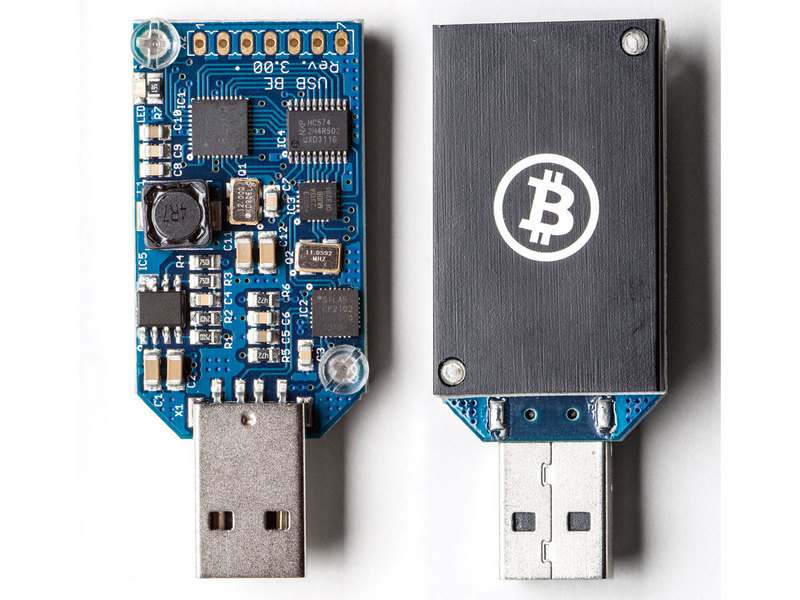
YES I know they are not profitable, but all of this was just to see how easy it really is to get an ASIC mining rig going.
Buy it Here


Step Two: Wait (I DO NOT LIKE THIS PART)

Wait around for a week or so for my equipment to arrive.  When it came in and I finally got to play with the Raspberry Pi...well...sort of...I realized I had forgot to buy a SD card to load an OS on, so Best Buy here I come.

Step Three: OS Time

Weighing the options as to what OS to load: Arch linux, Raspbian, a horde of other, I finally came upon MinePeon and it caught my eye as a good turn key solution. If you haven't looked into MinePeon before, take a look here, it's an interesting and useful distribution specifically written for mining. It comes with all the tools built in including cgminer and bfgminer, plus a nice little web interface for monitoring your miners and their performance with email updates if your hash drops too low, or a miner dies on you.

It took a little while to flash the image to the SD card, but once done, it loaded easily to the Raspberry Pi.  Next I crossed my fingers, powered it up, and low and behold it boot flawlessly and found all the USB miners with no fuss or configuration needed.

Step Four: Pool Configuration

One of the nice things about using the MinePeons' web interface is the ease of configuring all you pools, I pointed the miners to my slush pool account and BAM it started mining.

The ease of install was a breath of fresh air, there where no configuring scripts, no making sure everything was in the right place, no finding drivers and SDKs, etc. etc.  It was actual plug and play...go figure. The whole process took less than an hour with 30 minutes of that spent downloading and flashing the MinePeon image on to the SD card.

To recap, all I did was:
  • Purchase 10 USB ASIC Block Eruptor - Bitcoin Miners, 1 Raspberry Pi, and a 10 port powered USB hub
  • Plug all the miners into the hub and the hub into the Raspberry Pi
  • Load the MinePeon image on to the SD card, stick it in the Raspberry Pi and powered up 
  • Set up my pools and start to mine

The USB ASIC Block Eruptor - Bitcoin Miners did about 330KH/s as advertised, and I ended up with a 3.3 GHs mining rig for...well...lets just say more than you would want to spend for a 3.3 GHs mining rig...BUT I walked away with a bit of knowledge and that is worth every penny!


Read More
// // Leave a Comment

Auto-Switch Mining Vs. Single Pool Mining

We have been asked by some of our readers which is more profitable, auto-switch mining ( multi pool mining ) or single pool mining.

It is an interesting question and with more and more auto-switching pools becoming available, a timely one.

To best answer this, we have set up a side by side comparison test which we will be running over the next month.

The test is being performed on two identical mining rigs running on the same network.  The miners are running Xubuntu on MSI motherboards, they are running two 7970 cards each averaging between 715 and 750 KH/s per card.

The test will run for one month and we will be comparing results weekly in total BTC and average performance.

For the single pool, we are using coinotron.com mining LTC with RBPPS payout.

For the auto-switching pool, we are using  multipool.us all payouts will follow the guide we wrote for multi pool mining which you can read by clicking here.

We will post the results weekly to the end of this post as well as posting a separate analysis once the test is complete. If you have any suggestions or comments please post.

Weekly Progress Report:


Friday, January 17, 2014
Start Test

Friday, January 24, 2014
Single Pool mining LTC: 0.0531086748176898 BTC
Multi Pool Mining: 0.09709125 BTC

Sorry for the delay in week 2

Tuesday, February 4, 2014
Single Pool mining LTC: 0.12048 BTC
Multi Pool Mining: 0.16155933 BTC

Friday, February 7, 2014
Single Pool mining LTC: 0.061 BTC
Multi Pool Mining: 0.090473 BTC

Friday, February 14, 2014
Single Pool mining LTC: 0.05276 BTC
Multi Pool Mining: 0.0969843 BTC

End Test

Totals:
Multipool.us: 0.44610788
Coinotron LTC: 0.28734867481769

Read More
// // Leave a Comment

Put Linux on Your Stick

When I decided to start mining part of my motivation was a interest in putting together a Linux computer.  As this would be a dedicated  miner CPU and storage speed was not of concern.  A entire operating system on a USB stick, how cool is that.   Overall the operation is quite simple.  Get a 1 Gig and a 8 (or more) Gig  USB stick, choose your distribution of Linux, and a software program to load your Linux distribution onto your USB and you are ready to turn that rig on!

Whoa, hold on, there is a little more to consider here.  Now there are probably some real technical gurus out there the will kill this, but they weren't around during my days of trial and error, so this is what worked for me.

The first thing that hung me up was the 32bit operating system.  Many guides revolve around this, but many were written before the release of the latest cgminer 3.7.2, which so happens to be a 64 bit distribution.  Now you can re-compile cgminer  to 32 bit, but this was a little over whelming for me(actually over my head), especially after many hours.  It was just easier to install 64bit and get over it. 

The other thing is patience!  From start to thinking you are going to start mining is going to take a few hours.  Not a lot of effort on your part, but there are reboots, installs, and updates that just take time due to the natural slowness of a USB stick.  Just remember you only paid $10 for this stick,so don't expect greased lightning.

So, choose your Linux distribution of choice.  I elected to use xubuntu - http://xubuntu.org/  Download it and save it in a spot you can remember.

I did have issues getting a 64 bit distribution installed with some installers, I won't name names but it would default to a 32 bit install and even when selecting the 64 bit file that I saved above it would give a error that this distribution is not accepted.

So, I found this piece of software did the trick for me, no games, no messing around.  You pick what you want and it will create your Linux bootable USB: http://www.pendrivelinux.com/universal-usb-installer-easy-as-1-2-3/  I used a 1 Gig USB stick for this.  Haven't seen any issues, and be sure to save this stick as you can use it to get multiple rigs started.

You may need to change your MOBO Bios to select USB to boot from, but my two different cards booted right up.  Xubuntu will ask if you wish to "try" or "install".  At this point put your 8 Gig USB in hit install, and you are off an running.  I did connect to the internet and selected the option to install updates during the install process, though there were more updates once completed.  Depending on your internet speed you should have a Linux computer ready to start installing necessary mining software and tools in a hour or two.


Read More
// // Leave a Comment

To mine, or not to mine, that is the question 2

Well we covered the "for fun, no risk" should I mine aspect previously, but what next?

Do I go past a couple cards, or couple rigs, or wait for ASIC or FPGA  releases?   . If we knew all that information along with where the coin prices were going it wouldn't be any fun now would it?

Since I have started Litecoin mining difficulty has risen substantially.   In large part to all the press given to cyrpto coins in general and also based on the fact that GPUs are relevant in scrypt mining.  At least at the moment.  GPUs allow us regular "Joes" to run down to our local electronics stores and put together a mining rig in short order.   To the point there was a real shortage of GPUs the last few months, but that seems to be stabilizing at the moment.

FPGA/ASIC technology I am told is so much easier to manage, and does reduce power consumption in a positive way, but recent releases have proven that scrypt mining is not as easy in a FPGA environment and the gains are no where near that experienced for Bitcoin.   These release have yet to beat GPUs in anything other than maybe maintenance.


Mining is really not about your profit today, it should be about your potential for tomorrow.  I personally do not want to be like the person in the first official Bitcoin transaction who purchased 2 pizzas for 10,000 Bitcoins.  This person probably had a million of them, but still, a little patience would have paid of f big.  I just wonder if the pizza guy had patience.

GPUs will remain relevant for the time being, so additional GPUs I will add.  In the mean time be careful of the technology releases that claim to good to be true performance, if it were real it would be great but in a prepay situation, you have little leverage if the development ends without success, or the delivery keeps pushing due to lack of funds.  

I am personally in this for the long haul and playing with money I plan to either loose or make a healthy profit from.   It all depends on the coin Gods!


Read More
// // Leave a Comment

Multipool.us: Best practices for auto-pool mining.

We have been testing out many of the auto-switching pools over the past few weeks.  As a result of that testing and setup, we have come up with how to use the multi-pool's auto payout threshold in conjuction with Cryptsy.  This will allow you to better trade out your volatile alts for less volatile BTC and LTC.

We have found the best results using www.multipool.us.  The interface is clean and conformed.  They provide many scrypt and SHA coins to mine ( see full list here).  Best of all is the way they calculate profitability, which is better than we have seen in any other auto-switching pools.
Profitability is calculated by taking into account the current price at which each coin is trading, as well as the difficulty of mining that particular coin. 
https://www.multipool.us/help.php

There are really 2 options when mining in an auto-switching pool.  The first option is to auto-sell coins as they come in at an exchange, like Cryptsy.  The second option would be to hold the coins for a better value.  Both options have pros and cons.

Option 1. Auto-sell

The trick to this option is to have consistent payouts from the pool. This will make it easy to sell the coins off without creating a wall and spiking the volume. To help you figure out where you should set your auto-payout threshold, take a look at the chart for the coin on cryptsy.  This will offer a good idea of the volume of the market and the average trade amount. Try to keep the payout close to the average order amount without having the payouts stack before selling.
We have found having many smaller trades helps insure your coins are sold and helps prevent selling your coins undervalued, as each auto-sell is based on current pricing.  If you have your threshold set too high you may end up holding a bag of coins that keeps declining in value.

if you are unfamiliar with the Cryptsy Auto-Sell feature please check this post out:
http://www.cryptopros.com/2014/01/cryptsy-auto-sell-feature.html

Pros

  • Coins usually sell quickly.
  • Sales of coins follow market closer.

Cons

  • Potential profit loss if price were to go up.

Option 2. Hold

This option is very simple and could pay off, but the risk involved is much greater.  It involves choosing between holding your coins in the pool or transferring them to an exchange like Cryptsy (we always transfer to an exchange to be flexible if the market has drastic changes). After making your decision, you would then just wait and see what happens.

Pros

  • Coin could take off with high profit gains.

Cons

  • You could be left with a bunch of worthless coins.

Conclusion

We use option 1, we found that you will see more profits buy selling coins at the current value and taking advantage of the lower difficulties. This could change over time but for the near future it seems to be the right option.
We use Cryptsy more as a tool then a true exchange.  They have a huge amount of trading pairs and their auto-sell feature takes the headache out of auto-switch mining.


Multipool.us Coin List

SHA-265                               

Scrypt                     

Bitcoin (BTC):            Litecoin (LTC):
Freicoin (FRC):                            FeatherCoin (FTC):
PeerCoin (PPC):Mincoin (MNC):
Terracoin (TRC):WorldCoin (WDC):
Zetacoin (ZET):DigitalCoin (DGC):
NovaCoin (NVC):
LuckyCoin (LKY):
Argentum (ARG):
PhenixCoin (PXC):
MegaCoin (MEC):
BottleCaps (CAP):
Cryptogenic Bullion (CGB):
DogeCoin (DOGE):
Diamond (DMD):
Grandcoin (GDC):
Mooncoin (MOON):
Earthcoin (EAC):
Lottocoin (LOT):
Read More
// // Leave a Comment

To mine, or not to mine, that is the question

I started crytpo currency mining for a handful of reasons.  A little nudge from my friends over at Cryptopros.com , a interest in putting together a Linux based computer, a little room on a credit card, and of course a opportunity to make some cash on the side.  Sounds like a easy and good decision, worst case is I end up with a decent computer that with a few minor upgrades could be a great gaming computer. 

After spending about $700 dollars I had a week to investigate and decide what to due with all the cool new stuff I was getting.   At the time I didn't realize how many different options were available, I just new there were two systems/types of protocol.  SHA256 and Scrypt based currencies.   During my comparisons it became clear that the SHA256 based currencies would not provide a lot of bang for my meagerly equipped system.  Bitcoin is obviously the  big dog in the crytpo world and has a very high valuation attached to it justifying a high amount of computing power, or miners supporting the system.   I was initially confused, as I understood that Bitcoin had a high value and high hash rate, but looking at the secondary currencies (ie mining targets) their hash rates were also very high, but the valuations in some cases were little or nothing.  It took awhile before I understood what was happening and figured out merged mining when I joined CEX.IO (future Blog).

So Scrpyt mining  here I come, and it looks like it will be Litecoin as it has value and my little system theoretically should gain 2 Litecoins per week after electricity.  Not bad, system payed off in a few months, and then I am rolling in the dough!

So I receive my final box from UPS on a late Friday afternoon and begin my work.  I won't go into the gory details here, but lets just say that 4 days later, and several serious considerations of throwing the whole lot in the swimming pool I am mining! WOOT!  This is easy, the pool I signed up with can see my hash and within a hour of getting my rig running I get my first payout!  Just call me easy money! Ok, till the mother board goes up in a puff of smoke.   A power supply and another mother board later that first rig is up an running and has been now steady for 3 weeks with no issues.

The Pool seems to be good though I have nothing to compare it to.  Our average to find a block is about 5 hours, though we have had a few found in minutes, and then the dreaded 36 hour spans, where everyone gets grumpy, but over all it averages out. The pool runs about 97% of the expected time to find a block, so I guess that is good.

So, I have my Linux based rig and I can claim the novelty of being a miner of something that is very similar to air. My family is perplexed as regardless of how I explain it they cannot get past the "you can never touch, see or feel it" aspect of crypto currency.

In the next installment I hope delve into some of the justifications for and against crytpo currency mining. At least those that exist in my mind!


Read More
// // Leave a Comment

A new way to mine.

We have been testing out CEX.IO and must tell you, we like it. One of the many nice things about this service is being able to trade mining power as a commodity. Once you have purchased hash power it immediately starts to work for you with no setup of maintenance. The funds made from mining go directly to your account and with the merged mining setup on the miners you get some extra profit from IXC, DVC, NMC along with BTC. Another feature of this service is the redeem hardware function, with this you can have the mining power that you have purchased in the exchange and have it shipped directly to you.

With the exchange, merged mining, and hardware redemption, this service is hard to beat. This is a unique service and we are looking forward to using this service on more than just a test basis.

We have GPU, FPGA, and ASIC miners at our location each taking time and skill to configure and get up and mining CEX.IO makes the process of mining mindless.

CEX.io
Read More